
The real question is not “should we use AI Agents?”
A better question is: which recurring work still burns strong people, yet is safe enough that a machine can draft or prepare it?
Many SMEs hear “24/7 autonomous agents” and try to automate sales, finance, and support in one leap. The usual result is a shiny demo, rising token cost, and a team returning to spreadsheets and chat because nobody trusts the output.
This article gives a practical deployment frame for Vietnamese SMEs: pick the right work, design controls, measure ROI early, then scale.
An AI Agent is not a virtual employee for everything
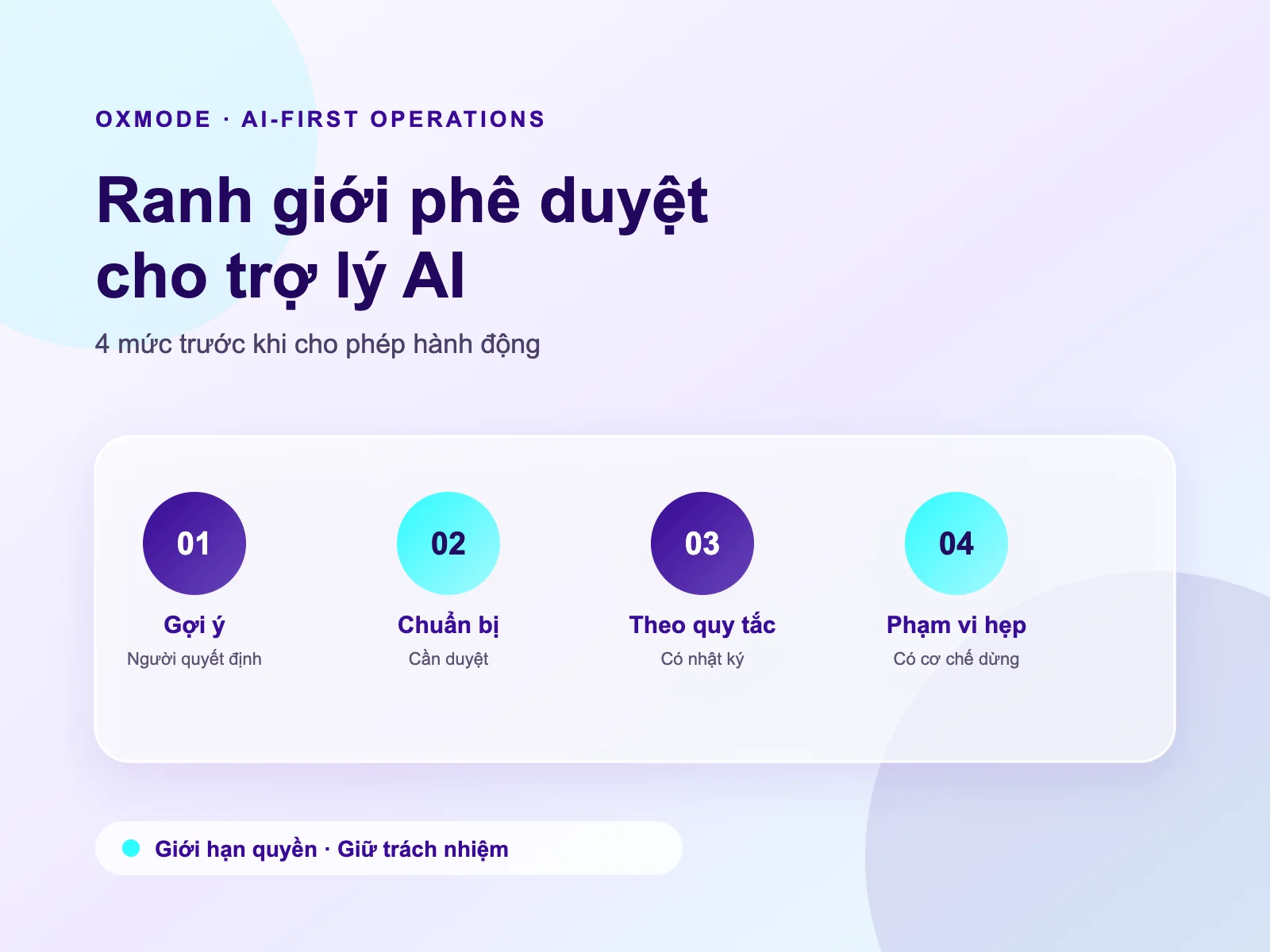
In real operations, separate three levels:
- Copilot — AI drafts, summarizes, proposes. A human decides and sends.
- Bounded agent — AI runs inside a workflow with rules and tools. Humans review critical steps.
- Autonomous action — AI updates systems, notifies, or creates tasks. Enable only with audit, rollback, and a clear owner.
Most SMEs should stay at levels 1–2 for the first 90 days. Level 3 is only for low-blast-radius actions (drafts, tags, reminders)—not payment approval or hard customer replies.
Five signals a process is ready for an AI Agent
- The same work repeats at least 5–10 times per week.
- Inputs are reasonably structured (forms, ticket fields, meeting notes).
- Outputs have a clear pass/fail bar for fast human review.
- Mistakes do not create immediate legal/financial damage.
- There is a system of record (CRM, tasks, tickets)—not only a chat group.
If everyone still does the process differently, standardize first. An agent will not fix chaos; it will replicate chaos faster.
A 4-step rollout (2–4 weeks per use case)
Step 1 — Pick one painful job with a safe blast radius
Good first use cases:
- Internal meeting summary + action items
- Weekly report draft from existing data
- Tier-1 ticket triage by topic
- Onboarding checklist prep by customer/contract type
Avoid first:
- Final pricing
- Complaint replies end-to-end
- Bookkeeping or money movement
Step 2 — Write the agent “contract” before the prompt
Every agent needs six lines:
- Goal
- Valid inputs
- Allowed tools
- Hard denials
- When to stop and ask a human
- Audit trail
Without this, the team is experimenting with AI, not operating a process.
Step 3 — Put human-in-the-loop in the right places
- Content generation → agent drafts, human quick-reviews
- Important status changes → human approval
- External communication → human send or locked templates
- Internal low-risk writes (tags, drafts, checklists) → agent OK with audit
Do not design “humans review everything” (bottleneck) or “agent does everything” (loss of control).
Step 4 — Measure three numbers for 14 days
- Cycle time from input to accepted output
- Human edit rate on critical corrections
- Token + ops cost versus manual hours
If edit rate stays above ~40% or trust is low, do not scale. Tighten inputs/rules or drop back to Copilot.
A minimal architecture for SMEs
- System of record: CRM / tasks / tickets
- Workflow triggers on create/status change
- LLM + whitelisted tools only
- Review queue for process owners
- Audit log of what the agent did, when, and on which record
Put the agent inside a running process. A generic chat assistant that “knows the company” is rarely the highest-ROI start.
Five common traps
- Starting from tools instead of one operating KPI
- Beautiful prompts without tool/permission boundaries
- Pushing sensitive data into models without scope control
- No process owner for output quality
- Scaling before a 2–4 week green pilot
Go-live checklist
- Safe blast-radius use case
- Written agent contract (goal/input/tools/denials/escalation/audit)
- Human approval for external or high-impact actions
- Logs for input/output/reviewer/time
- One-minute kill switch
- Manual baseline for 14-day comparison
- Clear escalation path for the ops team
Conclusion
AI Agents help SMEs when they sit on one concrete process, with narrow permissions, human control where it matters, and measurable outcomes.
Do not ask “how do we hire a perfect virtual employee?” Ask: which work can the agent draft well enough that a human only needs 30 seconds to approve? That is the ROI starting line.
If the team is stuck between spreadsheets, chat, and disconnected tools, OXMODE can help pick one use case, design bounds + workflow, and measure results in weeks—before anyone talks about company-wide automation.